Posts

Showing posts with the label #App

Quickbooks Format Changes

Image
Your clients Quickbooks are changing! Coming soon to Quickbooks, a change in formatting. Originally, your clients displayed a classic form template. In the next couple of weeks, this will be replaced by the standard form template. However, this will be a simple transition! These two formats are very similar and will be easier for you and your client to display information. Quickbooks has also taken the chance to redesign the screen layout for a less cluttered look. They have also added some new sales form styles and custimization options. WIth this new update your clients will be able to:  Select from multiple templates with different designs Experiment with various colors within statements Pick from a variety of fonts To make sure the new form meets your needs, theres are many customization options. To open your templates, click the  Gear icon > Custom Form Styles .  To change the Standard style for all types of forms, click  Edit  or ...
Intuit Quickbooks Introduces Reorder Points

Image
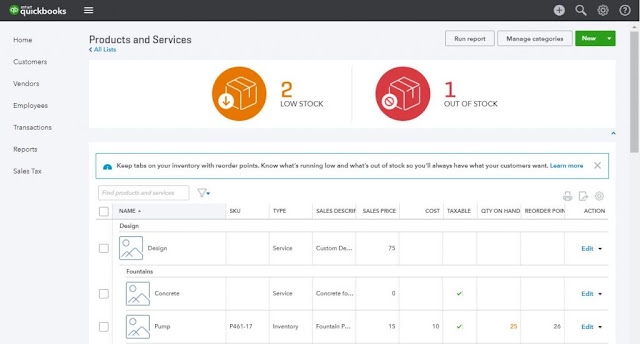
You now have the ability through Inuit's latest version of Quickbooks to take control of your businesses inventory.  With the newest update, the most recent Inventory Reorder Point feature lets you set a minimum quantity of a product to keep on-hand at all times. Once the on-hand quantity is at or under the assigned threshold, QuickBooks will notify you to order more stock, as well as easily creating a purchase order to restock those items. This helps you not run out of stock when customers need it the most! Also, this new feature takes the stress off of counting inventory. With easy to read tables and all your inventory data in one spot, it is a breeze to navigate through cash flows and inventory levels.  Setting a reorder point You can create a reorder point when you add new inventory items into QuickBooks. To set it up for an existing item follow the steps below. 1. Click the Gear icon → Products and Services. 2. Find the inventory item in the list. 3. In...

QBO App For Mac

Image
QuickBooks Online now has an app for Mac users! And it's free! Just download the new QuickBooks Online App from your App Store on your Mac! The app will show up on your desktop, so all it takes is one click and you have access to your books! You can stay signed in, have an easier navigating system and the pages load faster! You can even have multiple windows open! Just drag and drop windows, this way you can see your Sales Transaction list as well as Open Invoices, or even the check form and the bank register! There is even a Quick View Quick View helps you be up to date on what is going on in your business, straight from your desktop! New to QuickBooks Online? There is so much you can do with QuickBooks Online  You can create invoices, accept payments, you can even take photos of your receipts and upload them to QuickBooks! Have Point of Sale or thinking about getting Point of Sale? If you have a Point of Sale system, iPad by Revel or Deskt...

New To QuickBooks Online?

Image
So, you finally broke down and signed up for QuickBooks Online. There is so much you can do with QuickBooks Online  You can create invoices, accept payments, you can even take photos of your receipts and upload them to QuickBooks! Have Point of Sale or thinking about getting Point of Sale? If you have a Point of Sale system, iPad by Revel or Desktop version, it automatically updates your QuickBooks Online. No more double entry and no more staying up all night entering end of the day transactions! With QuickBooks Online you can: See who has paid and who hasn't by looking on the home page! Receive invoices fast! With our payments feature your customers can press a "pay now' button and your invoices will be paid instantly via credit card or bank statement.  QuickBooks automatically takes in statements from your bank and credit card accounts, this means less work for you and it helps reduce double entry errors Best part abou...

QuickBooks Online: The Easiest Way To Manage Your Business

Image
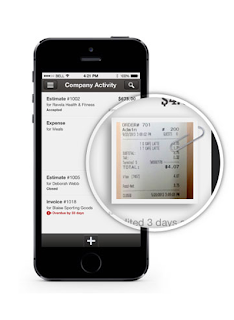
The QuickBooks Gal loves QuickBooks Online! There is so much to love about it! First QuickBooks Online can be downloaded as an app to any smart phone or tablet. That way you can be up to speed on all your business needs!  This includes Apple Watch! Are you an Apple person? Everything you own, including your watch, is Apple. QuickBooks Online can now work with your Apple Watch, get live updates regarding your business! Track Expenses: Take pictures of receipts and easily upload them to QuickBooks Online. No double entry mistakes and be ready for when it comes to tax time! Send Invoices: Easily send invoices via email from QuickBooks Online to your clients. You edit the invoice any way you like, that includes inserting your company logo  You will be able to see when they received it and even when they opened the email. Your customer will be able to pay you through the email via the "Pay Now" button Plus be able to see who has paid ...

QuickBooks Online Updates: Check Out What's New and Improved

Image
Check out what is new and improved on this new QuickBooks Online update! Bank Feed: Now you can edit the check number in the bank feed! Left nav > Transactions > Banking >  table gear > Check no Once that is finished you are able to change the check number  Inventory Tracking: Now be able to see the quantity available when you enter in a sales form. Now when you are creating an invoice and enter an inventory item QBO will tell you how many is available or if you are out of stock.  QuickBooks Online is the easiest and fastest way to run your business. With the mobile app you can check up on your business anytime, anywhere!  Now there is a QuickBooks Online Desktop App for Mac and Windows, allowing you to always be signed in, work in multiple tabs at once, and it is faster! Check out why we love it so much! Have a QuickBooks Mess? Call the QuickBooks Gal!

October QuickBooks Online Updates

Image
QuickBooks Online has updated! Here are the new features! Inventory Tracking: "Item" Drawer: Clicking NEW now displays a drawer where it allows you to create a new product or service Gear > Lists > Products and Services > New. Three Item types: QBO only allowed you to have two item types, now there are three! Inventory Item: Any item you buy or sell and need to track the quantity you have on hand  Non-Inventory: Any item you buy but don't need to track the quantity Service: Any service you provide to customers, such as training or installation  Bank Feeds: Mark a bank transaction as a billable expense and assign it to a customer:  Left nav > Transactions > Banking Find the transaction, click billable then chose the customer to bill it to. Add an attachment to a bank transaction: Ever wanted to attach the receipt or a photo to a bank transaction? Now you can! Left nav > Transactions > Banking Find tran...

The QuickBooks Gal Loves XERO

Image
Xero is an accounting software for small businesses. It is great for invoicing, bank reconciliation, reporting, and contacts. Benefits of switching to Xero: Log in anytime, anywhere on your Mac, PC, tablet or phone to get a real-time view of your cashflow.  Get paid faster with online invoicing!  The invoice will send to your client and they will be able to pay you, straight from the email! You will even have a notification when they open the email! So no more "I never got that email" Run your business on the go with the mobile app! Use the mobile app to reconcile, send invoices, and create expenses Xero imports and categorizes your latest bank transactions so all you have to do is click OK to reconcile.  That easy! Call The QuickBooks Gal today to get started on XERO!

QuickBooks Online Keyboard Shortcuts

Image
Because we like making your life a little bit easier we have created a keyboard shortcut for QuickBooks Online :) For the full list visit: https://help.quickbooks.intuit.com/en_us/kb/000001110_en_US:SALESFORCE.modal?searchTrigger=null Entering Dates: Next day + (plus key) Previous day - (minus key) Today T First day of the Week W Last day of the week K First day of the Month M Last day of the month H First day of the Year Y Last day of the year R Choose items in drop down list: Press Tab until you reach the field. Press Alt + down arrow to open the list. Press up arrow or down arrow to move through the items in the list. Press Tab to select the item you want and move to the next field. If you don’t want to open the whole list, but just want to scroll through the items in the text box, press Ctrl + down arrow or Ctrl + up arrow.   Save Forms: press Alt + S instead of clicking Save.   In Firefox and Chrome use Alt + Shift...

QuickBooks Online Update

Image
There is a new update for QuickBooks Online! Making it easier to use and creating less work for you! Inventory Tracking: Now be able to upload a product image and create individual SKU for every inventory item Be able to see more products in one list Copy existing items by clicking duplicate so you don't have to re manually add them Make multiple inventory items inactive by going down the list and checking the boxes next to your inventory items Emails: There is now a cleaner look to the emails that are sent out to clients reminding them their payments are due. Making you look more professional!  QuickBooks Online now has a Desktop App for Mac and Windows! Be able to open your QuickBooks straight from your desktop! You can even have multiple pages up so you can work on different businesses at once! QuickBooks Online is made to make your life easier! Call The QuickBooks Gal today to start working on your QuickBooks Online, it does mo...

New Desktop App For QuickBooks Online

Image
Good news QuickBooks Online users! There is now a QuickBooks Online App for Windows and Mac! quickbooks.intuit.com/download Check out the amazing new features: Get straight into working by just clicking the desktop app! Pages now load faster, no matter waiting! You can stay logged in, which means you can start wherever you left off! Use the same keyboard shortcuts you already know and love! Save time with automatic refresh of open windows—when you edit an expense, an open report in another window will automatically refresh with the data. Easily work within multiple windows that you can drag and drop anywhere, even across screens and side by side. You can fire up the QuickBooks Online App straight from your desktop! QuickBooks Online is made to help you make running your business a lot easier. With the QuickBooks Online app you can check up on your business anytime, anywhere with any smartphone or tablet! Have any...