Posts

Showing posts with the label #QuickBooks #Payroll #bookkeepin #Checks

QuickBooks 2013 is Discontinuing
Image
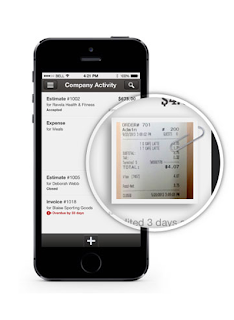
May 31, 2016 QuickBooks 2013 will be discontinued.  If you have 2013 now, don't be alarmed, your product will still work you just won't be able to have tech support or have add-ons. Products that will be discontinued May 31st: Pro 2013 Premier 2013 Mac 2013 Enterprise Solutions 2013 What can you do? Upgrade to QuickBooks Online!  THE QUICKBOOKS GAL IS OFFERING THE FIRST 30 MINUTES FREE TO SET UP AND TRAIN FOR QUICKBOOKS ONLINE!  There is so much you can do with QuickBooks Online  You can create invoices, accept payments, you can even take photos of your receipts and upload them to QuickBooks! Have Point of Sale or thinking about getting Point of Sale? If you have a Point of Sale system, iPad by Revel or Desktop version, it automatically updates your QuickBooks Online. No more double entry and no more staying up all night entering end of the day transactions! With QuickBooks Online you can: See who has paid an...

What's New In QuickBooks Online!

Image
Show Attachments column on Expenses list:  This shows the number of attachments per expense. Click a number to view thumbnails, and then click a thumbnail to open or download the attachment. Transactions >Expenses > Table Gear > Attachments .  Copy bank description to memo: Automatically copy the bank’s transaction description to the Memo field, making it visible on more reports, like General Ledger. Transactions > Banking > Table Gear > Copy Description . You don’t have to copy it yourself each time. The Date filter now includes a choice for All dates: Transactions > Sales > Filter > Date and Transactions > Expenses >Filter > Date. New keyboard shortcut:  Press the Esc key to close transaction forms (invoice, expense, etc.). Other fixes: You can now batch print more than 50 invoices at a time. Voided invoices are now properly labeled on the customer detail page and sales transactions page. Editing a customer’s addr...