Posts

What to Know Before Choosing a Bookkeeper

Image
Five Things to Look for in a New Remote Bookkeeper * It’s hard enough hiring the right person for your bookkeeping needs when you had a stack of 100 resumes to review. Now you’ve got people spread out across the globe vying for your attention through email marketing, websites, social media…the list goes on. And it’s entirely true that when it comes to the physical tasks of bookkeeping, geography doesn’t matter much anymore. So with that said, how do you make the right choice in selecting a remote bookkeeper for your small business? To help you navigate, here are a few criteria to consider… Location, Location, Location This sounds strange, right? Remote, by definition, means not nearby. But hear me out, in this case, it’s not so much where your potential bookkeeper lives, but when they lived. Take into account time zones when deciding on a new bookkeeper. If you know you’ll need to talk on the phone, or are likely to request any given morning on short notice, will they be ava...

New Year, new way to view your mail!

Image
New Year, new way to view your mail! Are you often checking your mailbox only to be disappointed? Now, you can save yourself a trip by using USPS Informed Delivery® This feature, found on USPS website at https://informeddelivery.usps.com/box/pages/intro/start.action allows you to digitally preview your mail and/or packages before they arrive to your home. Informed Delivery allows you to preview the size of your mail, see who they are coming from and where they are in their journey from the post office, to you, all in one place! You can also provide instructions on where you want the package or reschedule your delivery if you are not home. However, not all areas of the country qualify for this service, confirm with your zip code using the link above before you begin. Once approved, you will be asked to create an account, verify your identity and have the ability to receive notifications. View your mail anytime, anywhere on any smart device for no additional cost! Got a...

Changes to Nevada Quarterly Bonds

Image
Nevada Quarterly Bond Assessments Eliminated as of 10/01/2017 As of the fourth quarter in 2017, The Nevada SUI quarterly bond assessment has been terminated. However, the SUI average rate has stayed the same going into 2018. According to a representative from the Nevada Department of Employment, Training and Rehabilitation (DETR) the department anticipates that it has repaid it’s outstanding bond balance completely. Therefore, the Department had decided that the third quarter of 2017 is the last period that employers will pay the bond assessment. Starting the fourth quarter of 2017, employers will not surrender a bond assessment return or pay the bond assessment. As an employer, you should be receiving notice of the elimination of the bond assessment by mail before the fourth quarter SUI tax return. Information for this blog was accumulated from Ernst & Youngs Newsletter. For more information, please visit their website at https://taxnews.ey.com/Login/NewsroomLo...

2018 TAX TABLES

Image
New Tax Tables! As of 2018, The International Revenue Service (IRS) has established new income-tax withholding tables to accommodate for the 1.5 trillion dollar tax overhaul. This updated version has been the first major rewrite in 30 years. If you are not familiar with this newly passed tax cut, it provides large cuts to corporations and the wealthy while giving mild cuts to middle and lower class. For the latest news on these tax cuts and information for this blog provided by: IRS.gov/Notice1036 Below includes the table for Percentage Method for Income Tax withholding for wages paid in 2018. For tips on how to interpret these tables visit: https://www.irs.gov/pub/irs-pdf/n1036.pdf For all your Quickbooks needs, call the Quickbooks gal!

Quickbooks Format Changes

Image
Your clients Quickbooks are changing! Coming soon to Quickbooks, a change in formatting. Originally, your clients displayed a classic form template. In the next couple of weeks, this will be replaced by the standard form template. However, this will be a simple transition! These two formats are very similar and will be easier for you and your client to display information. Quickbooks has also taken the chance to redesign the screen layout for a less cluttered look. They have also added some new sales form styles and custimization options. WIth this new update your clients will be able to:  Select from multiple templates with different designs Experiment with various colors within statements Pick from a variety of fonts To make sure the new form meets your needs, theres are many customization options. To open your templates, click the  Gear icon > Custom Form Styles .  To change the Standard style for all types of forms, click  Edit  or ...

What's New: Mobile Time Tracking

Image
New Improvements this Month! When using Quickbooks online, you now have the ability to track time more efficiently than ever. Not only does this option have a better look to it, but are now included on your computer and mobile phone. Not only does the mobile option make it easier on employees to report time, but employers to record it. Below, we have displayed both computer and mobile  views. With an update to this option, its goal is to encourage more interaction. Time-tracking employees can enter in time sheets weekly, or by activity. You can also observe summaries for a certain time period as well. Benefit Alert! Solely time-tracking users are non-billable, so small business owners can add as many time trackers and they need in order to run their business efficiently!  Have fun time tracking with this new and improved feature!  For more information, feel free to visit Quickbooks Website @  http://quickbooks.intuit.com/blo...

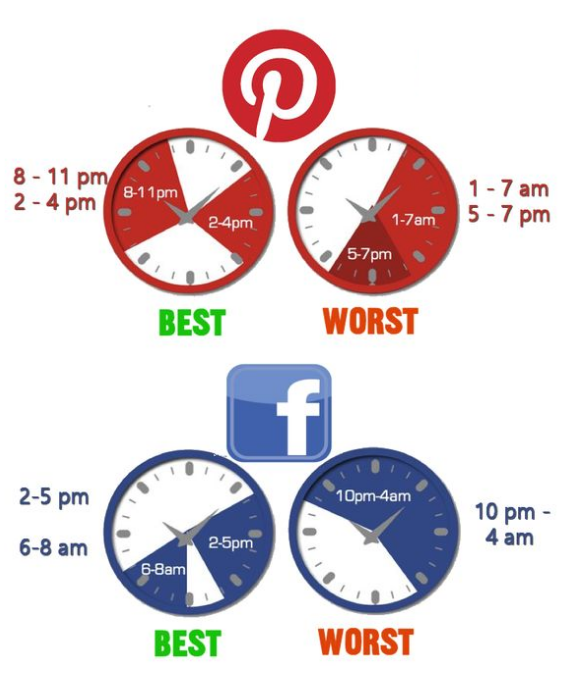
When to Post on Social Media: Best and Worst Times

Image
Does your small business have a social media presence? To expand your presence on social media, it's crucial to be online when your customers are. In order to get the most active viewers per post, schedule when you are sharing the posts you want everyone to see. Audiences differ from site to site, so make sure you know who you are appealing to and when to do it. Here are the most popular times of day people use the top four social media platforms: For more informative facts like these, visit pinterest.com and check out our personal page: @QbGal Got a Quickbooks mess? Call the Quickbooks Gal!