Posts

Showing posts with the label #Apps

Intuit Quickbooks Introduces Reorder Points
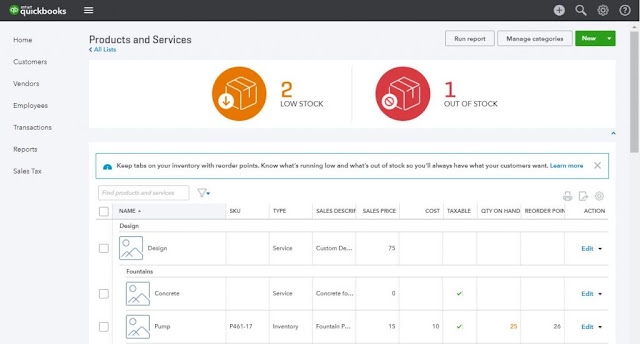
Image
You now have the ability through Inuit's latest version of Quickbooks to take control of your businesses inventory.  With the newest update, the most recent Inventory Reorder Point feature lets you set a minimum quantity of a product to keep on-hand at all times. Once the on-hand quantity is at or under the assigned threshold, QuickBooks will notify you to order more stock, as well as easily creating a purchase order to restock those items. This helps you not run out of stock when customers need it the most! Also, this new feature takes the stress off of counting inventory. With easy to read tables and all your inventory data in one spot, it is a breeze to navigate through cash flows and inventory levels.  Setting a reorder point You can create a reorder point when you add new inventory items into QuickBooks. To set it up for an existing item follow the steps below. 1. Click the Gear icon → Products and Services. 2. Find the inventory item in the list. 3. In...

The QuickBooks Gal: Book Online

Image
You can now book your appointment online at www.qbgal.com! Just head to the front page and click on 'Book Now' to get started! The QuickBooks Gal is here to help you and your business! Big or small The QuickBooks Gal can help you! QuickBooks: Got a QuickBooks Mess? Call The QuickBooks Gal! The QuickBooks Gal helps with set-up, clean up and more! Bookkeeping: The QuickBooks Gal bookkeeping services are suitable for any industry: aimed towards businesses of small to medium sizes.  The QuickBooks Gal takes care of all your bookkeeping needs. Services include: Set up Clean up Ongoing Bookkeeping Process daily sales and deposit reports Verify daily deposits and report variances Reconcile and verify credit card deposits Reconcile monthly bank statements ​        And more! Payroll: The QuickBooksGal will take the hours and rates of your employees and manage them in an orderly fashion.​ What Does This En...

QuickBooks Online: Attachments

Image
QuickBooks Online allows you to attach receipts, invoices, bills and much more! Why Would You Want To use Attachments? Useful when Tax season comes around! You can easily pull up the transaction and show the bill, invoice and receipt How to upload: Attachment Page: Gear > Attachments This is helpful when you want to upload multiple attachments You can drag and drop the PDF or JPG files into the attachment box on the top of the page, or click on the paper clip OR Click on the transaction you wish to add an attachment to, or add a new transaction (fill it out like any transaction i.e date, amount) On the bottom left there is a box that says attachment, click on the box or paper clip and upload the file you wish to attach.  Save Done! Easy! How Can I Upload Documents To My Computer? You can scan the documents on any printer/scanner and save them to your computer.  You might need to read your printer manual to find out how to scan phot...

More Reasons To Love QuickBooks Online

Image
The QuickBooks Gal cannot get enough of QuickBooks Online!  And why not? There is so much to love about it!  It's Mobile!: With the QuickBooks Online Mobile App you are able to check up on your business anytime, anywhere on any mobile device. Including your tablet! How nice would it be to sit on the beach and check up on your business without having to leave your vacation?  See Who Has Paid..And Who Hasn't!: With QuickBooks Online you can see who has paid you and who still needs to pay you. What's even better? You can send invoices to the people who still need to pay you, with the payments feature your customers can press a "pay now' button and your invoices will be paid instantly via credit card or bank statement.  How easy is that?? Save Time and Reduce Double Entry Errors: Take pictures of your receipts and upload them to QuickBooks Online, no more saving receipts and trying to figure out which one you have already entered in! Sync QuickBooks On...

New QuickBooks Online Apps and Add-On's

Image
QuickBooks Online has Apps and Add-On made to help you get the most out of QuickBooks Online Here are some of the newly released apps! Trippeo: Travel a lot? With Trippeo you can book rooms, track reports, and reimburse travel expenses!  Bill Warrior: Have trouble remembering to bill your clients? Maybe having clients pay you? With Bill Warrior it sends reminders to your clients informing them when their bill is due, or past due. Once linked to your QuickBooks Online it sees who has paid you, who hasn't, and who will be needing to pay you. It finds the customers information and send them an email notifying them when there bill is due.  Bid Saw: The easiest way to capture everything you need in order to make an accurate bid. Take pictures of a site, take specific notes and more!  All your projects are in one place, including: Contact information, status, notes, line items, photos and more are all in one place. ...

QB Gal: QuickBooks For Mac

Image
Are you in love with your Apple Products? Don't Worry, so are we! That's why QuickBooks created QuickBooks For Mac..Created for Mac by Mac users!  Designed just for your Mac: Enjoy special features designed just for Mac users! Keep an eye on your business with QuickView in your Mac’s menu bar. Use multiple windows and keyboard shortcuts to speed through common tasks and workflows. Everything you need in one spot: Track sales and expenses, create estimates, manage customers, collaborate with your accountant, and more. All in one place!  Get paid faster: Create professional-looking invoices and let customers pay you by credit card or bank transfer. Less work for you! Anytime, anywhere access: Enjoy QuickBooks on your Mac, smartphone, tablet, and the web. Data syncs automatically so you’ll always have the latest information at your fingertips. Just like QuickBooks Online you are able to have access to your QuickBooks anytime, anywhere Track your...

QuickBooks Online Mobile App Updates: Have Clients Sign Invoices

Image
QuickBooks Online has apps and add-ons made to help you get the most out of your QuickBooks Experience. QuickBooks Online has a Mobile App so you are able to check your business information anytime, anywhere. On the beach, at the grocery store, even at the In-Laws house you can check how your business is doing from inventory to who has yet to pay you! Recently there has been an update for QuickBooks Mobile App. Here is what is new and noteworthy! IPhone: Own a IPhone 6 or 6Plus? QuickBooks Online Mobile App now works for the bigger screen size Customer Signatures on Invoices and estimates: Simply tap 'Get Signature' on the bottom of an invoice or estimate and have your customer sign using their finger! IPad: The Profit & Loss has been updated: Be able to choose from 4 different reports and set a date range Balance Sheet Report: Be able to see current asset, liability, and equity account balances  IPad and IPhone: Use Tou...

QuickBooks Online: Updates Coming Soon

Image
QuickBooks Online has some new updates coming your way!! Here are just a few Hide Information Be able to hide sensitive information and access whenever you need it! Be able to see recent transactions Click the clock icon in the upper left of a transaction form to view a list of recent transactions Timesheet Entry Now more convenient by getting rid of the horizontal scrolling Now be able to see subtotals by days Receive payments by Invoice Number Send statements from customer detail.  Now be able to send a statement from the customer detail page, not just from the group customer screen Up/Down Arrow Keys Be able to use the arrow keys for better navigation around QuickBooks Online. Customer Details Be able to read Customer notes/Details by clicking anywhere on their row For more information about updates visit: http://quickbooks.intuit.com/blog/whats-new-in-quickbooks-may-2014/ QuickBooks Online is here to make your life easier!...

QuickBooks Apps: Helping You Make Running A Business Easier!

Image
Did you know that QuickBooks has Apps and Add-Ons to help you get the most out of your QuickBooks?  Here are a few of my favorite apps and why you need them for your business! T-Sheets: T-Sheets works with your QuickBooks and helps track employee time for payroll, invoicing and job costing! With T-Sheets you can have your employees clock in using items they are already familiar with!: Computer, phones (mobile and land phone), text message and even Twitter! With the T-Sheets mobile app you are able to track your employees via GPS. Be able to see their routes, how long they stay at one place, and more Transaction Pro Importer: Do you tend to create a lot lists?  With Transaction Pro Importer you are able to import any list or transactions from any text or Excel file. No matter what type of data it is Transaction Pro will be able to import it into your QuickBooks Online instantly! Method CRM: With Method CRM you are able to keep track ...