Posts

Showing posts with the label #bookkepping

IRS Changes Deadlines

Image
IRS changes W-2 & 1099 filing deadlines In an effort to prevent fraud,  The Protecting Americans from Tax Hikes (PATH) Act of 2015   was passed by Congress and signed by President Obama in December 2015. One key provision revises the filing deadline for Form W-2 and certain types of Form 1099.  What's Changing? Until now, employers had two dates to keep in mind when remitting W-2's: January 31, to provide employee copies, and February 28, for paper filings submitted to the Social Security Administration (March 31 for electronic filings). Beginning with forms for tax year 2016 , the filing deadline for all federal W-2s is  January 31 . This is true for both employee and agency copies, or whether filing paper or electronic returns.  What about Form 1099-Misc?   The new January 31 deadline applies to certain types of 1099s.    If you're filing Form 1099-Misc and reporting amounts in  Box...

Intuit Quickbooks + Paypal

Image
Good News! Quickbooks is teaming up with PayPal By the end of 2016, small businesses can now send invoices and accept payment through QuickBooks and PayPal. Yet another way to get paid quicker and easier! If you are a QuickBook user, you will be able to send your customers an invoice through QuickBooks Online and have PayPal be an option for payment.  Nearly 188 Million people use PayPal. so this update can result in more convenience for you and your customers! How reliable is this? PayPal when working with Quickbooks will automatically carry over it's pre-existing data. Also, this past year,  Australia implemented PayPal into their Quickbooks and thousands of small businesses found they got paid on average two times faster! Here are some other features that you may benefit from:  Import PayPal payments and fees into QuickBooks. When a customer pays with PayPal, the invoice will automatically be marked as paid.   Securely download o...

Quickbook Updates

Image
Your Quickbook Reports are Updating! In the weeks to come, you will be seeing some updates and improvements to your reports: • More options for professional-looking reports that can easily be shared and printed. • Customizing reports will be  easier than ever, especially with more new options. • 10 new ready-to-use reports, with more to come. Don't worry, you can still use any custom reports you've previously made . First off,   to access these improvements....   Click Reports in the left navbar, followed by the name of a report (like Profit & Loss). If you don't see that, click Gear; QuickBooks Labs and to turn on the Redesigned Reports. Now,  you can explore the new features such as Change the common options at the top of the page, as well as c hange other report options Add notes Expand/collapse sub-items Edit header to  show a logo &   change the report title and subtitle Print, email or save report as PDF & many more! ...

New Changes To QuickBooks Online

Image
QuickBooks Online form designs are getting a makeover! Invoices, estimates and sales receipts will look a bit different by the end of this week. The change will allow you to: Save and us multiple templates Choose from different styles Resize columns Capture invoice signatures directly on your phone or tablet Enlarge your logo by uploading it again.  Have any questions regarding QuickBooks? Call the QuickBooks Gal! You can now book online by visiting www.qbgal.com Click the 'BOOK ONLINE' button on the home page!

Spring and Summer Is Coming! And So Are The Bugs!

Image
Spring is right around the corner-and then summer!  Which means bugs! From mosquitoes, spiders and beetles no one wants to deal with them inside their home or office! Here are some natural ways to get rid of the pesky bugs for your business and your home! Mosquito: Mosquitoes hate lavender! You can plant some around your home or restaurant if you have a deck that your guests dine out on. Note: Flies also hate it as well Follow this easy DIY mason jar candle tutorial to keep the mosquitoes at bay and also create a beautiful center piece for the tables:  http://www.thesnug.com/keep-bugs-away-with-a-mason-jar-repellent-1215091644.html?crlt.pid=camp.EEXgzAqR8JLV Spiders: Spiders hate mint! You can have a few plants around the house or you can put it in spray bottle (water and few drops of mint oil) and spray around the house, office or anywhere else you do not want to see spiders. Flies: Everyone hates being annoyed by flies! If you own a restauran...

QuickBooks Online: Attachments

Image
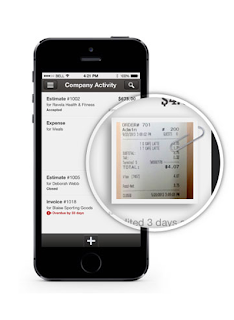
QuickBooks Online allows you to attach receipts, invoices, bills and much more! Why Would You Want To use Attachments? Useful when Tax season comes around! You can easily pull up the transaction and show the bill, invoice and receipt How to upload: Attachment Page: Gear > Attachments This is helpful when you want to upload multiple attachments You can drag and drop the PDF or JPG files into the attachment box on the top of the page, or click on the paper clip OR Click on the transaction you wish to add an attachment to, or add a new transaction (fill it out like any transaction i.e date, amount) On the bottom left there is a box that says attachment, click on the box or paper clip and upload the file you wish to attach.  Save Done! Easy! How Can I Upload Documents To My Computer? You can scan the documents on any printer/scanner and save them to your computer.  You might need to read your printer manual to find out how to scan phot...

New To QuickBooks Online?

Image
So, you finally broke down and signed up for QuickBooks Online. There is so much you can do with QuickBooks Online  You can create invoices, accept payments, you can even take photos of your receipts and upload them to QuickBooks! Have Point of Sale or thinking about getting Point of Sale? If you have a Point of Sale system, iPad by Revel or Desktop version, it automatically updates your QuickBooks Online. No more double entry and no more staying up all night entering end of the day transactions! With QuickBooks Online you can: See who has paid and who hasn't by looking on the home page! Receive invoices fast! With our payments feature your customers can press a "pay now' button and your invoices will be paid instantly via credit card or bank statement.  QuickBooks automatically takes in statements from your bank and credit card accounts, this means less work for you and it helps reduce double entry errors Best part abou...

QuickBooks Online 1099: Tips And Tricks

Image
It's Tax Season!  Time to get the W2 out to the employees and the 1099's printed! The QuickBooks Gal is here to help make it a bit easier for you and your business! Here is how to get your 1099 ready! Getting started: Go to Vendors - Prepare 1099 - Get Started Review Company Details! Fill out all necessary items such as Company Name, Filing Address, Tax ID and the payees name, which is you! Look over all details, if you need to change anything on the form click the pencil icon on the far right to make changes Assign Vendor Payments: The next step is to pick all the categories that go to your vendors and tell QuickBooks which accounts were used to track those payments  Confirm 1099 The next step is to make sure all information is correct, including name and address File your 1099! With QuickBooks Online you have the option to send your 1099 via E-File service or print and mail the forms in your self! Pretty easy! Ne...

Tax Season Is Almost Here!

Image
It may be the holiday season but it is also get prepared for tax season season!  Time to start gathering your supplies!  Here is what you might need: W-2 1099 and plenty of envelopes! You can get these at any office supply store IRS also gives out free forms at 800-829-FORM You can order extra transmittal 1096 and W-3 forms from there Happy Holidays! 

Having Problems With The New QuickBooks Online Desktop App?

Image
Did you download the new QuickBooks Online Desktop App? It's great! You can access your QuickBooks in one click!  Although we are experiencing some glitches. Unable to log in? Restart your computer Check your internet Double check your login and password Still unable to login? Go online and log in through here https://qbo.intuit.com/qbo36/login You should be able to log in and get right into your books!  Check out why we love the Desktop App

QuickBooks Online Keyboard Shortcuts

Image
Because we like making your life a little bit easier we have created a keyboard shortcut for QuickBooks Online :) For the full list visit: https://help.quickbooks.intuit.com/en_us/kb/000001110_en_US:SALESFORCE.modal?searchTrigger=null Entering Dates: Next day + (plus key) Previous day - (minus key) Today T First day of the Week W Last day of the week K First day of the Month M Last day of the month H First day of the Year Y Last day of the year R Choose items in drop down list: Press Tab until you reach the field. Press Alt + down arrow to open the list. Press up arrow or down arrow to move through the items in the list. Press Tab to select the item you want and move to the next field. If you don’t want to open the whole list, but just want to scroll through the items in the text box, press Ctrl + down arrow or Ctrl + up arrow.   Save Forms: press Alt + S instead of clicking Save.   In Firefox and Chrome use Alt + Shift...

We Have A New Look!

Image
The QuickBooks Gal is getting a makeover! We still will help you with Bookkeeping, Payroll and more but we will also specialize in helping you with QuickBooks Online! Check out our newly designed website! http://www.qbgal.com/ Not only that but we are now certified with XERO! Easy To Use Log in at anytime to see invoices, bank statements and bills all on your dashboard. Plus Xero has a mobile app so you are able to check on your business anytime, anywhere. Payroll With built- in timesheets your employees can easily manage their time and attendance. You will be able to minimize compliance risks and increase employee productivity. Xero automatically calculates the hours for you. Tax Easily prepare and send out 1099's and W2. Xero automatically adds Sales Tax to all items, making sure all sales are accurate. You can also prepare and submit sales tax returns in a matter of minutes! Got a QuickBooks Mess? Call the QuickBooks Gal!  ...