Posts

Showing posts with the label #Bonds

Changes to Nevada Quarterly Bonds

Image
Nevada Quarterly Bond Assessments Eliminated as of 10/01/2017 As of the fourth quarter in 2017, The Nevada SUI quarterly bond assessment has been terminated. However, the SUI average rate has stayed the same going into 2018. According to a representative from the Nevada Department of Employment, Training and Rehabilitation (DETR) the department anticipates that it has repaid it’s outstanding bond balance completely. Therefore, the Department had decided that the third quarter of 2017 is the last period that employers will pay the bond assessment. Starting the fourth quarter of 2017, employers will not surrender a bond assessment return or pay the bond assessment. As an employer, you should be receiving notice of the elimination of the bond assessment by mail before the fourth quarter SUI tax return. Information for this blog was accumulated from Ernst & Youngs Newsletter. For more information, please visit their website at https://taxnews.ey.com/Login/NewsroomLo...

2017 Nevada Bond Rates

Image
2017 NEVADA BOND RATES What is the Nevada Bond and why do I have to pay? Nevada received federal loans to pay unemployment insurance benefits. To repay the loans, Nevada issued out bonds. To repay the bonds, all contributory employers, in addition to paying UI taxes, must also pay quarterly bond contributions. (NRS 612.6102-612.6134)  Bonds Issued to Repay Federal Loans. The State of Nevada has issued special revenue bonds, as provided for in recent legislation SB515, for the purpose of repaying federal loans needed to pay unemployment benefits. An advantage to using bonds to pay for these loans is that Nevada will no longer be a federal unemployment (FUTA) credit reduction state for the 2013 tax year, restoring the full federal credit offset of 5.4%.  Additionally, with the loans being repaid, no future interest associated with them will be accruing.  Contributory employers subject to Nevada unemployment insurance (UI) taxes will be required to pay a q...

The QuickBooks Gal: Book Online

Image
You can now book your appointment online at www.qbgal.com! Just head to the front page and click on 'Book Now' to get started! The QuickBooks Gal is here to help you and your business! Big or small The QuickBooks Gal can help you! QuickBooks: Got a QuickBooks Mess? Call The QuickBooks Gal! The QuickBooks Gal helps with set-up, clean up and more! Bookkeeping: The QuickBooks Gal bookkeeping services are suitable for any industry: aimed towards businesses of small to medium sizes.  The QuickBooks Gal takes care of all your bookkeeping needs. Services include: Set up Clean up Ongoing Bookkeeping Process daily sales and deposit reports Verify daily deposits and report variances Reconcile and verify credit card deposits Reconcile monthly bank statements ​        And more! Payroll: The QuickBooksGal will take the hours and rates of your employees and manage them in an orderly fashion.​ What Does This En...

2016 W-4 Form

Image
The 2016 W-4 Form has been released!  Below is the link https://www.irs.gov/pub/irs-pdf/fw4.pdf Make sure to print out and give to employees ASAP! Got a QuickBooks Mess? Call The QuickBooks Gal!

QuickBooks Online: Updates Coming Soon

Image
QuickBooks Online has some new updates coming your way!! Here are just a few Hide Information Be able to hide sensitive information and access whenever you need it! Be able to see recent transactions Click the clock icon in the upper left of a transaction form to view a list of recent transactions Timesheet Entry Now more convenient by getting rid of the horizontal scrolling Now be able to see subtotals by days Receive payments by Invoice Number Send statements from customer detail.  Now be able to send a statement from the customer detail page, not just from the group customer screen Up/Down Arrow Keys Be able to use the arrow keys for better navigation around QuickBooks Online. Customer Details Be able to read Customer notes/Details by clicking anywhere on their row For more information about updates visit: http://quickbooks.intuit.com/blog/whats-new-in-quickbooks-may-2014/ QuickBooks Online is here to make your life easier!...

QuickBooks Online: How to Pre-Fill Forms

Image
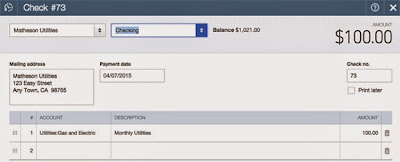
QuickBooks Online is here to make running your business faster and easier. Which is why there is a Pre-Fill option for QuickBooks Online To turn on this feature: Gear > Company Settings > Advanced > Pre-fill forms with previously entered content If you create a check to a certain vendor, such as QB Doc, you enter the account and the description and press Save and New. Then you create another check for QB Doc again, the same information will appear and all you have to change is the amount on the check! If Pre-Fill option was turned off you would have to re insert all the information again. Pre- Fill works for bills, checks, delayed charges, delayed credits, expenses, purchase orders, vendor credits, and credit card credits. Got a QuickBooks Mess? Call the QuickBooks Gal!

QuickBooks Online: Work With Multiple Currencies

Image
Does your business work with clients around the world? Do you want to have clients from around the world? QuickBooks Online allows you to work with multiple currencies so you can track all transactions no matter where they are from! To turn on multicurrency: 1. From the COMPANY tab select CURRENCY CENTRE 2. Click SET UP CURRENCIES From there you can assign a currency to new customers, new suppliers, and new bank, credit card and creditor accounts.  IMPORTANT Once multicurrency is on, it cannot be turned off. After you assign a currency to something, like a customer or a business account, it cannot be changed back.  QuickBooks Online allows you to work anytime, anywhere as long as you have internet connection! There is even a mobile app! Don't waste anymore time and get QuickBooks Online today!

Got A QuickBooks Mess?

Image
Call the QuickBooks Gal! We specialize in helping small to medium size businesses. We will work with you, for you, or teach you about QuickBooks, Sage 50, FreshBooks, and more. We have Advanced Certified ProAdvisors here to help.   Bookkeeping Our bookkeeping services are suitable for any industry: aimed towards businesses of small to medium sizes.  The QuickBooks Gal takes care of all your bookkeeping needs: Set up Clean up Ongoing Bookkeeping Process daily sales and deposit reports Verify daily deposits and report variances Reconcile and verify credit card deposits Reconcile monthly bank statements ​        And more! Payroll The QuickBooks Gal will take the hours and rates of your employees and manage them in an orderly fashion Payroll includes: Maintain Payroll Records E-Verify New Employees Process Payroll Direct Deposit Process Governments & Child Support Process Quarterly Tax Reports...

QuickBooks Online: Create and Manage Invoices

Image
New to QuickBooks Online? Don't worry the QuickBooks Gal is here How to create an invoice: Select the customer you would like to make an invoice to. It this is your first customer QuickBooks Online will guide you step by step. Choose the payment terms. This is the date you would like to be paid, it is defaulted to every 30 days but you are welcomed to change it depending on your wants and needs. Enter the product or service you are providing  Enter the rate or how much you want to charge the individual Choose the income account which categorises your receivables  And you're done! Simple and easy!  QuickBooks Online allows you to manage your business anytime, anywhere no matter where you are or what time of day.   Do Payroll the easy way! Simply turn it on whenever you need it! Tax calculations and forms are completed for you! Which means less work for you :) Make the switch to QuickBooks Online 

QuickBooks Online: Instant Report

Image
Be able to see how you are doing anytime and anywhere with QuickBooks Online. QuickBooks Online has pre-designed, customisable business reports so you can decided what you want to compare and what you want to keep track of. QuickBooks Online organizes all the information you request and make it to an easy to understand report so you and your employees can understand what the reports are saying.  There are other reasons to love QuickBooks Online, such as: See who has paid and who hasn't Receive invoices fast! With our payments feature your customers can press a "pay now' button and your invoices will be paid instantly via credit card or bank statement.  Capture receipts photos on your phone or tablet and then attach them to your QuickBooks expenses. No more saving receipts!  QuickBooks automatically takes in statements from your bank and credit card accounts, this means less work for you and it helps reduce double entry errors Got a QuickBooks Mess?...

2015 NV Quarterly Bond Rates

Image
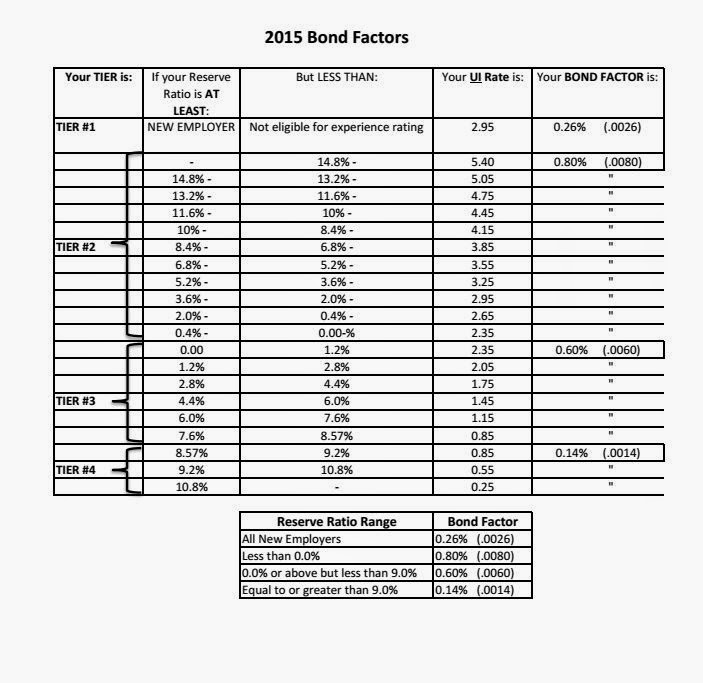
Happy Monday! The Bond Rates for the Nevada State Quarterly have changed, below is a spreadsheet of the appropriate changes to the rates  If you have any questions or concerns call 775-348-9225 Got a QuickBooks Mess? Call The QuickBooks Gal!